

SellerAmp with Rankerfox
Use SellerAmp SAS in the Rankerfox Premium plan to analyze Amazon products faster, estimate margin and ROI, read FBA/FBM competition, spot sourcing alerts, and decide whether an opportunity is really worth buying.
Tools
Web + extension + mobile
analysis at the desk, on Amazon, or in-store
Decision
Profit + ROI
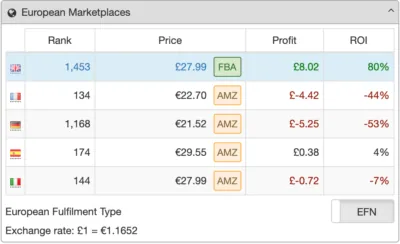
cost, fees, margin, breakeven, and max cost
Markets
7 marketplaces
US, UK, Canada, France, Spain, Germany, and Italy
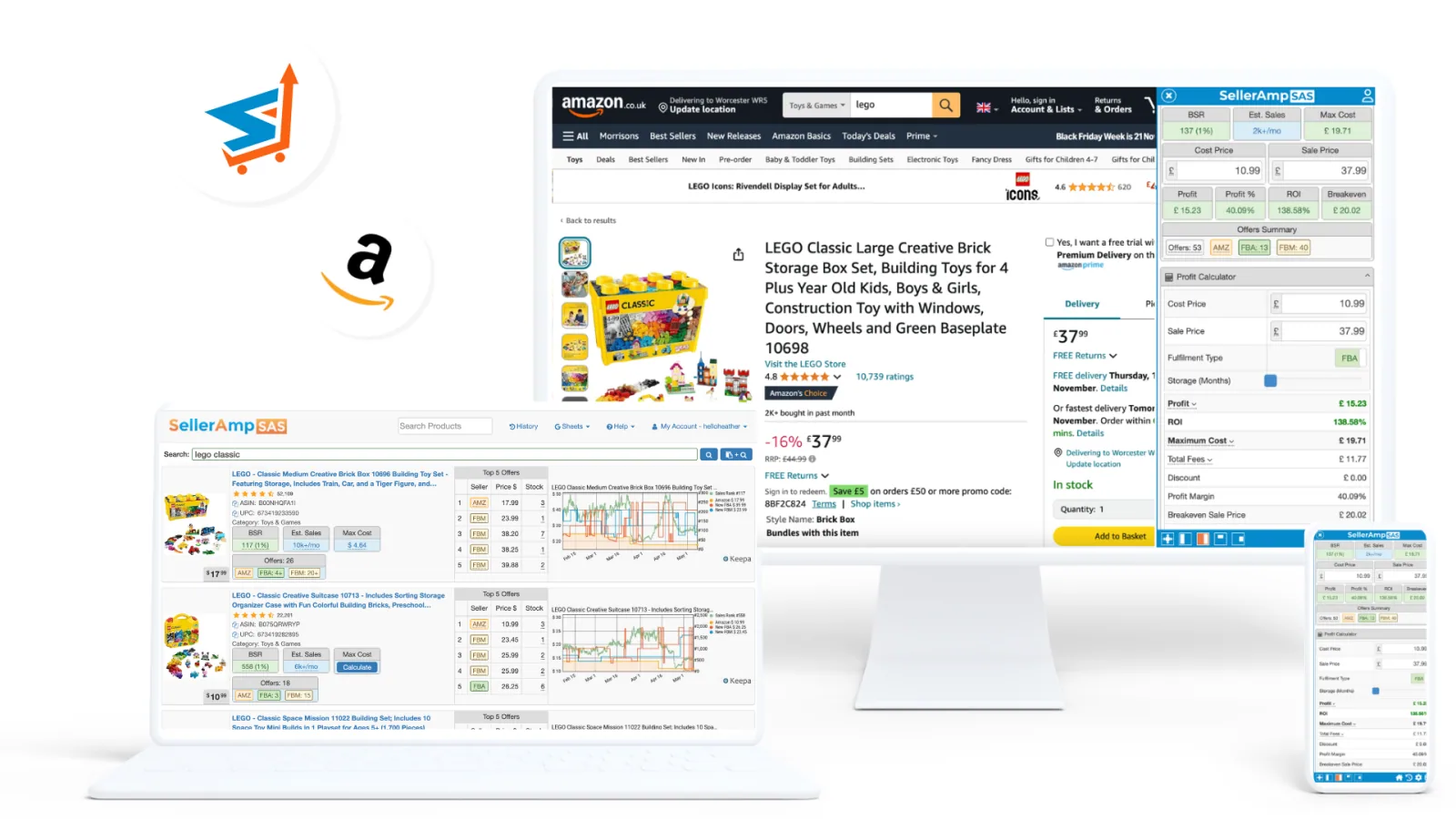
Why SellerAmp belongs in the ecommerce block
After Minea, PiPiADS, and Sell The Trend, SellerAmp shifts the angle: from product monitoring to Amazon buying decisions. It helps answer practical sourcing questions quickly: can I sell it, does it sell, and is it profitable after fees?
Compare purchase cost, sale price, Amazon fees, storage, shipping, margin, breakeven, and return on investment.
Spot signals that may block a decision: eligibility, Hazmat, Dangerous Goods, private label, IP, or selling constraints.
Explore products inside an Amazon seller storefront, review brands and categories, then launch product analysis from there.
Read BSR, Buy Box, FBA/FBM prices, Keepa history, and estimated sales before validating an idea.
Review sellers, stock, prices, fulfillment methods, and how your profitability changes if you match a competitor price.
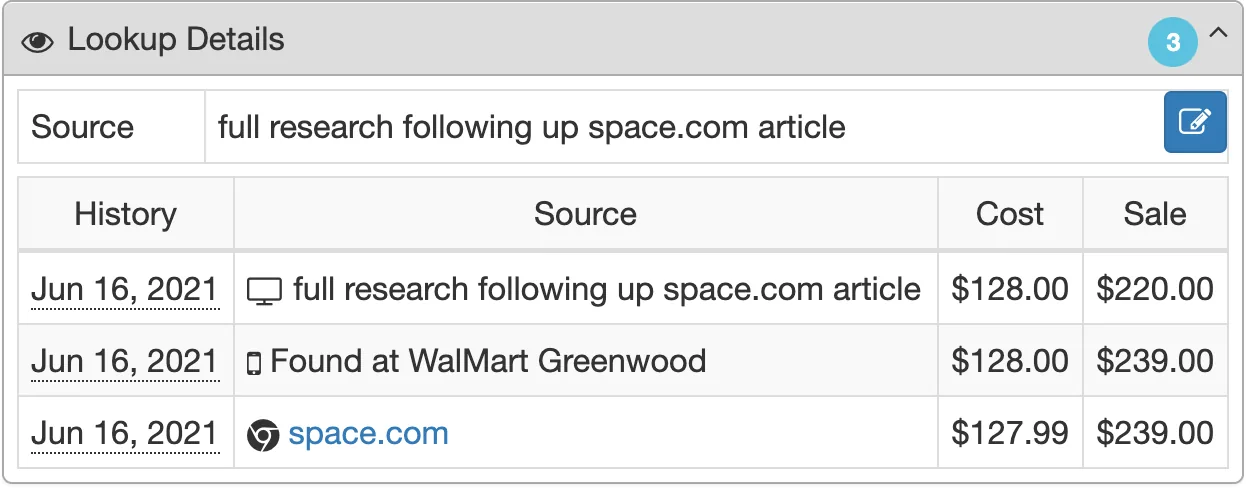
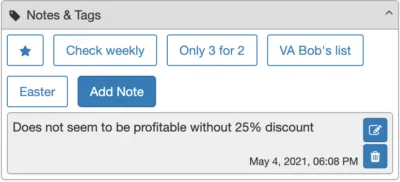
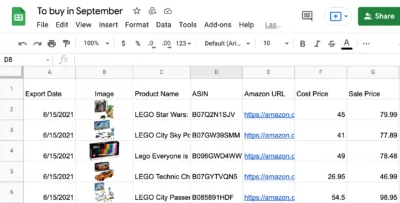
Keep analysis history, add notes and tags, then export to Google Sheets when sourcing needs team follow-up.
An Amazon decision, panel by panel
SellerAmp becomes useful when each panel answers a precise question: can I sell this product, at what maximum cost, against which sellers, with what price history, and which alerts should be resolved?
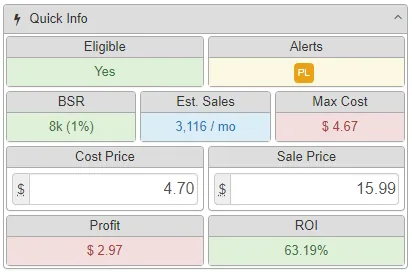
The quick panel gives a first read: eligibility, alerts, BSR, estimated sales, maximum cost, profit, and ROI.
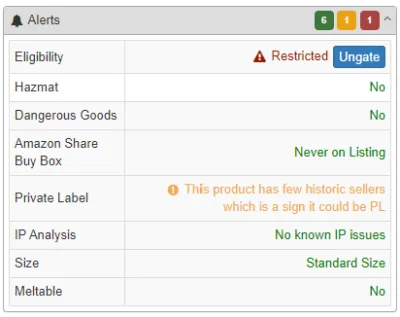
Alerts keep the decision from being only about margin: eligibility, Hazmat, Dangerous Goods, private label, IP, and signals that may block the sale.
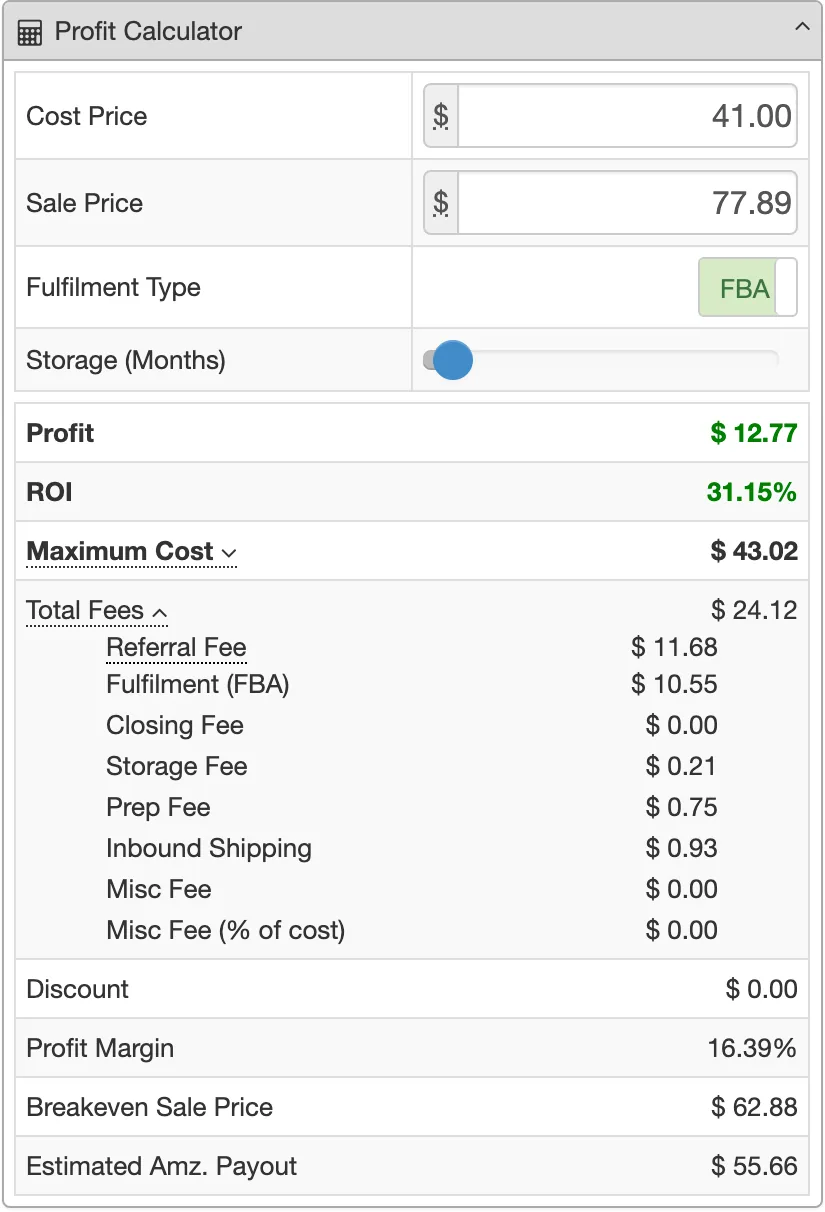
The calculator helps adjust cost and sale price to instantly see the effect on margin, ROI, fees, payout, and breakeven.
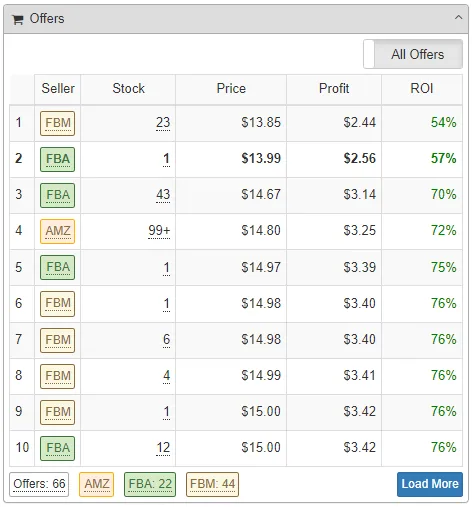
The offers view shows FBA/FBM sellers, stock, prices, and what happens to profitability if the market moves.
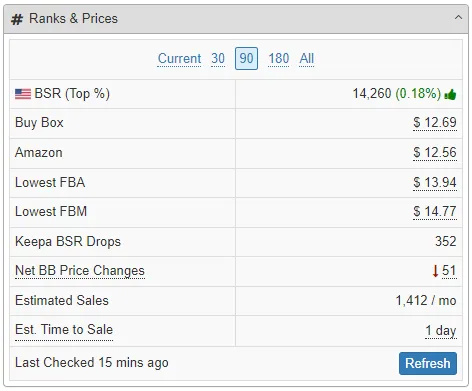
The ranks and prices panel groups BSR, Buy Box, Amazon price, FBA/FBM, estimated sales, and data freshness to read demand.
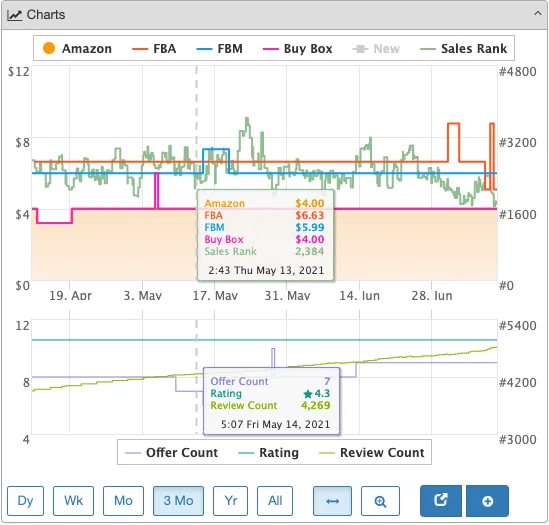
Charts help check whether price, Buy Box, or rank show a stable trend or only one favorable moment.
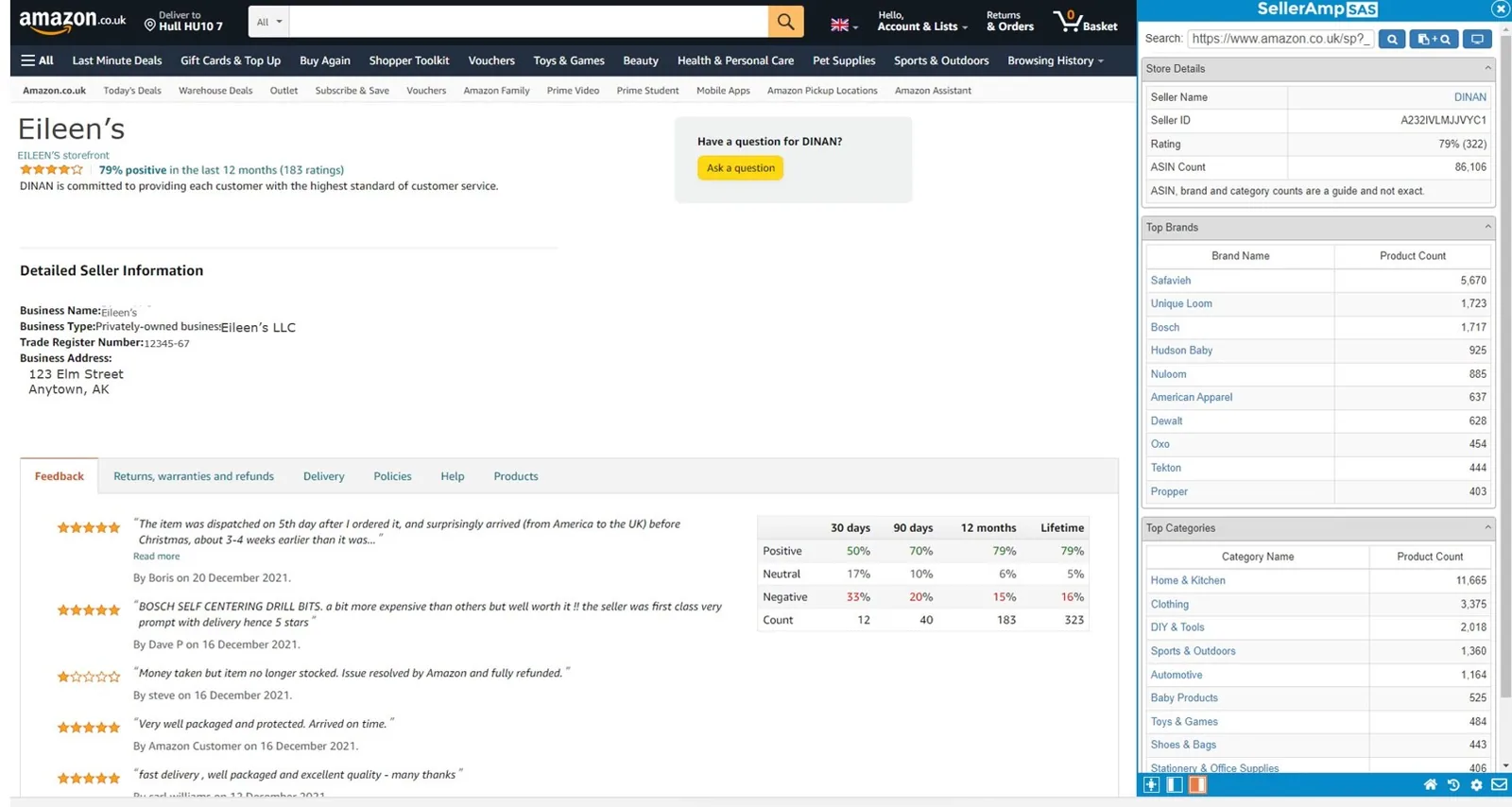
Storefronts provide another entry point: start from a seller, explore the catalog, then turn an observation into an analyzable lead.
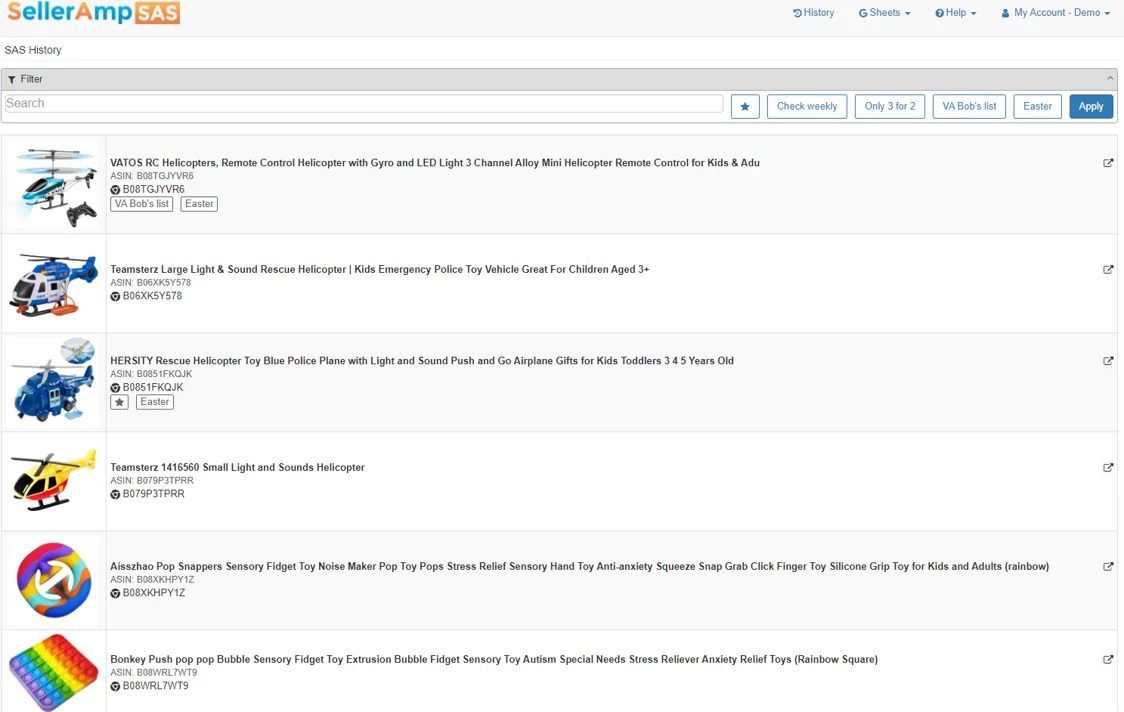
History helps retrieve products already reviewed, the assumptions used, and comparisons to revisit if a price changes.
Where SellerAmp becomes genuinely useful
Before ordering, SellerAmp helps check whether a product meets your margin, ROI, price, and sales-speed criteria.
Fulfillment method changes fees, target price, storage, and sometimes the ability to remain competitive.
Storefront Search helps find product ideas inside other Amazon sellers' catalogs.
BSR, estimated sales, Keepa history, and price movement prevent judging a product from one image or one price.
Notes, tags, history, and exports help compare several products without losing the assumptions behind each calculation.
Alerts, restrictions, unstable prices, too much competition, or a low max cost can protect your sourcing budget.
What to check before calling a product profitable
A green ROI does not always settle the decision. A stronger buy combines numbers, market dynamics, competition, eligibility, and the real ability to buy at the right price.
Maximum cost: if your real purchase price exceeds the threshold, it is no longer the same deal.
Buy Box stability: an attractive price today can disappear if several sellers compete tomorrow.
Stock and offer count: too much competition can slow rotation or pull prices down.
BSR and estimated sales: they give demand context, to be cross-checked with history and category.
Alerts and restrictions: eligibility, Hazmat, Dangerous Goods, IP, and private label can block the sale.
Tracking: keep notes, tags, and exports so you can compare products with the same assumptions.
Where SellerAmp fits into an Amazon routine
SellerAmp is especially useful when the team sources manually, compares supplier prices, follows competitors, or wants to speed up buying decisions.
Web app
UseWork full-screen to analyze several products, review history, and compare assumptions.
Use it at the desk when a shortlist needs a clean decision.
Chrome extension
UseLaunch analysis from Amazon or other sourcing sites with a side-by-side view.
Use it during product research and price comparisons.
Mobile app
UseScan or search products on the go, especially for retail arbitrage.
Use it when sourcing does not happen only behind a computer.
Google Sheets
UseExport analyzed products, keep the prices used, and share a list with the team.
Use it when several products need to be compared methodically.
A simple method for using SellerAmp
The best use is to separate product discovery from buying decisions. SellerAmp mainly makes the second step stronger.
Identify the lead
Start from an Amazon product, seller storefront, external source, or idea found through other ecommerce tools.
Filter risks
Review eligibility, alerts, competition, price, stock, category, BSR, and history before trusting the margin.
Set max cost
Calculate the maximum purchase cost that still meets your profit and ROI goals, then compare it to supplier reality.
Document the decision
Add notes, tags, exports, and assumptions so you can revisit the product if price or competition changes.
How to read SellerAmp signals
SellerAmp groups many data points. The decision gets clearer when every signal is tied to a concrete action.
Profit and ROI
They show whether the product meets your goals using the chosen purchase and sale prices.
Test several costs and sale prices to see the real safety margin.
Offers
Offers show competition, stock, FBA/FBM modes, and price pressure.
Compare your scenario against matching competitor prices.
BSR and estimated sales
They give an order of magnitude for sales pace in the category.
Cross-check with Keepa, price variation, and seasonality.
Alerts
They flag issues that may block or weaken the sale.
Do not buy before understanding every critical alert.
History
History helps retrieve previously analyzed products and calculation conditions.
Use notes and tags to compare opportunities over time.
SellerAmp's role next to the other ecommerce tools
SellerAmp does not replace Minea, PiPiADS, or Sell The Trend. It takes over when an idea becomes a more numerical Amazon decision.
Product research, dropshipping, stores, niche signals, and validation before testing.
Use it to surface product leads before moving into marketplace filtering.
Amazon analysis, profit, ROI, offers, alerts, storefronts, and arbitrage sourcing.
Use it when you need to decide whether a product can be bought and resold properly.
Broader Amazon product research, niches, volumes, trends, and marketplace analysis.
Cover it next to open the Amazon block with a more strategic view.
Ad monitoring, social creatives, hooks, products with traction, and competitor reading.
Use them to connect marketing signals and product opportunities.
Which Rankerfox access includes SellerAmp?
SellerAmp is presented as a Rankerfox Premium plan tool. It complements the ecommerce block with Amazon analysis focused on sourcing, profit, offers, and risks.
It mainly fits Amazon, arbitrage, wholesale, marketplace, and ecommerce profiles who often compare margin, competition, and sales speed.
Continue the marketplace block
Connect dropshipping product research and ecommerce validation before Amazon filtering.
Monitor ads, products, and stores before prioritizing a lead.
Frame an Amazon niche, its keywords, and its signals before buying validation.
Read TikTok/Meta creatives and related advertising angles.
SellerAmp with Rankerfox FAQ
Useful points before adding SellerAmp to your Premium routine.
Add SellerAmp to your marketplace routine
Compare Rankerfox plans and choose Premium if your work needs sharper Amazon reading: margin, ROI, offers, alerts, and sourcing.