
Ahrefs vs Majestic: auditing your backlinks
Compare Ahrefs and Majestic for referring domains, lost links, DR, Trust Flow, historical data and pricing before auditing a backlink profile.

Ahrefs or Majestic: start with the work you need to do
Consider Ahrefs when you want to connect backlinks with a site's pages and keywords; look closely at Majestic when link relationships, context and topics are the main job. The useful question is not which dashboard has the largest number, but which one helps you verify the links that matter.
An audit should lead to a decision: recover a lost placement, investigate an unusual source, find relevant publications or understand a domain's past. The illustrations below are public vendor examples, not results from a head-to-head test on one website.
| Your question | In Ahrefs | In Majestic |
|---|---|---|
| Who links to this site? | Referring domains and source pages | Ref Domains, backlinks and source pages |
| Why did a link disappear? | Loss reason, source page and redirects | Lost links, crawl dates and selected index |
| Is the link relevant? | Page, anchor, destination, DR and UR | Link Context, Topical Trust Flow, TF and CF |
| What happened earlier? | Historical access allowed by the plan | Fresh or Historic, within their actual date ranges |
| Which sources do competitors share? | Link Intersect, subject to plan | Clique Hunter, from Pro |
Start with referring domains, not the backlink total
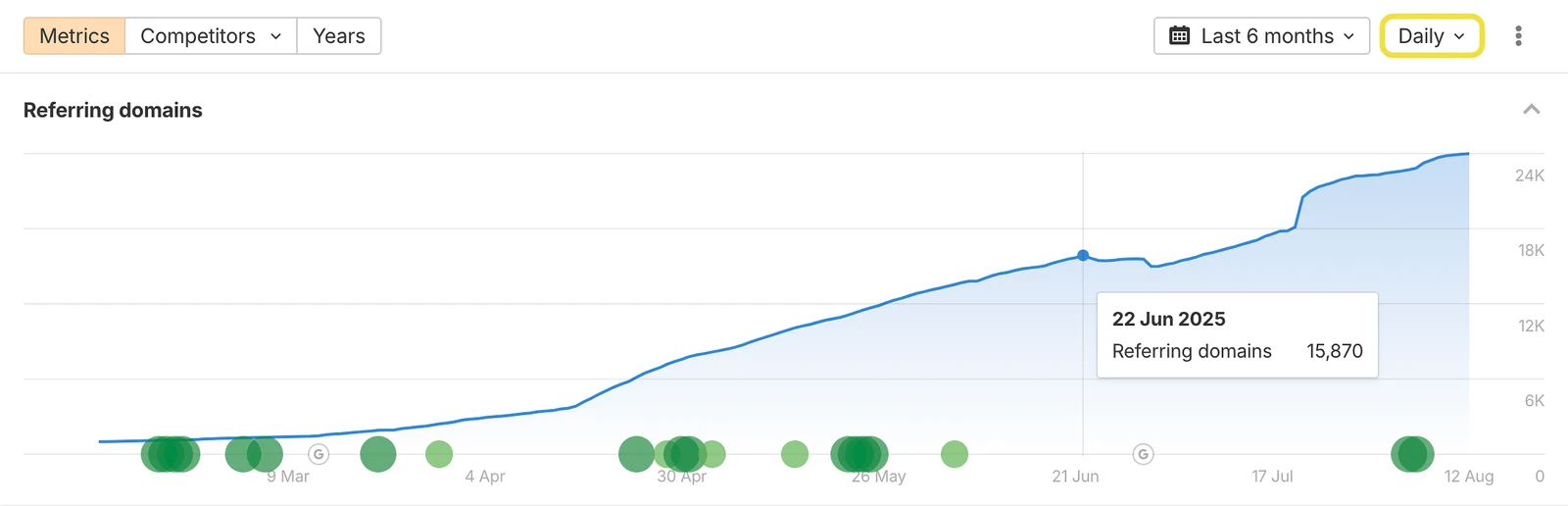
One domain might link from a single article or from a footer repeated across thousands of pages. The second pattern inflates the count without representing thousands of independent recommendations. Start with referring domains, then inspect the source pages behind any substantial change.
Before comparing exports, align the scope: root domain, subdomain or exact URL. Separate currently present links from historical relationships and use consistent link-attribute filters and grouping. Keep at least source domain, source URL, target, anchor, status and last observation date in your working file. One row per domain helps assess diversity; one row per page helps locate placements.
DR, UR and Trust Flow answer different questions
Ahrefs' Domain Rating places a domain's backlink strength relative to other domains in its database on a 0–100 scale. UR is page-level. A strong domain can still have a lightly supported source page, so inspect the URL that actually links to you.
Majestic combines Trust Flow, a quality-oriented signal within its link graph, with Citation Flow, a measure of link power. Topical Trust Flow adds subject categories. A DR of 40 cannot be converted into a TF of 20: these are separate models, not Google scores.
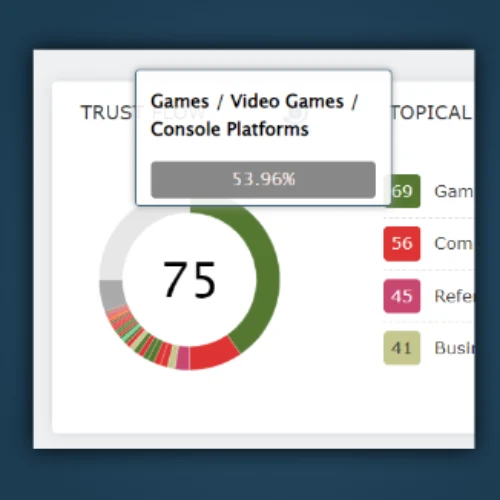
High Citation Flow with low Trust Flow is a reason to look closer, not an automatic spam verdict. For a hiking retailer, a relevant trail guide may be more useful than a higher-scoring general directory. Check the subject, placement, other destinations and usefulness of the page before pursuing removal or considering disavowal.
New and lost links: read the dates carefully
A discovery date is not necessarily a publication date. Ahrefs says finding a new backlink may take days to weeks. A spike can therefore reflect crawling rather than a campaign launched that day. Majestic's First Crawled likewise records an index observation.
For a loss, read the reason before contacting the publisher. Ahrefs distinguishes an unreachable page, a redirect, a canonical change, noindex and an actually removed link. These loss reasons do not all require the same response.
Open the current source and follow the final destination. If the old URL redirects to an article that still contains your link, the placement remains. If it points at one of your own 404 pages, fixing that destination may resolve the problem. If the article is live but no longer cites you, investigate the removal. Record the check date: the two tools may revisit the source at different times.
Historical access is not the same as a continuously complete archive
The Majestic glossary separates Fresh, built from recently crawled data, from Historic, useful for older relationships including links no longer present. Historic is not a list of currently live links. Check the actual index date range and update date: a long advertised history does not establish continuous coverage through today.
Ahrefs historical access depends on the plan. Six months is not enough to investigate a migration from eighteen months ago. For this week's placements, a very long historical window may matter less. Distinguish the data the vendor holds, the period your subscription opens and the date each source page was actually revisited.
Link context is more useful than an isolated score
Link Context provides surrounding text, other links and position and density cues. It helps distinguish a citation within a paragraph from a link block or repeated navigation element. Use the report for triage, then confirm the current placement on the source page.
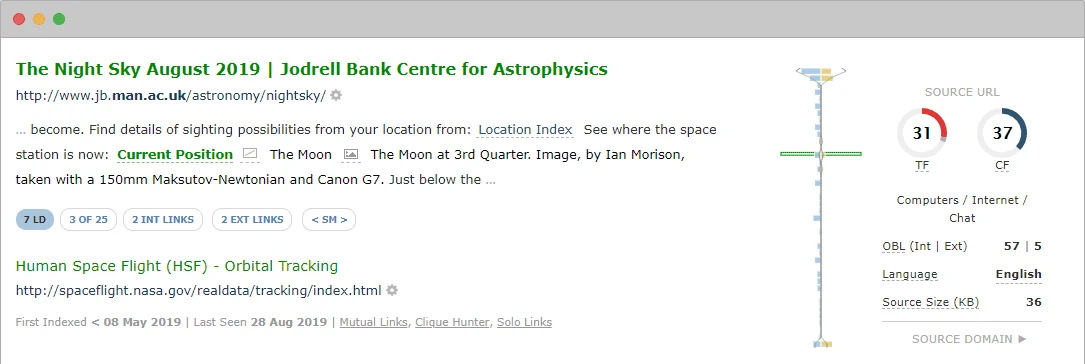
In Ahrefs, also start with the source page and anchor rather than DR alone. For a small shortlist, open every source. For a large export, group by domain, destination and placement type first, then review examples in each group. Five thousand repetitions of one link deserve a different treatment from twenty separate publications.
A practical comparison on your own website
- Choose a specific question. For example, which links to a commercial category disappeared after its migration? Record the period and old URLs.
- Align scope. Analyze the same destinations with matching grouping rules. Keep each export's origin before combining the lists.
- Match the sources. Separate pages present in both tools from those found in only one. An extra source is a lead to verify, not proof that an entire index is superior.
- Review an explicit sample. For example, open ten shared links, ten unique to each tool and the most important losses. Classify present, redirected, removed and unreachable sources separately.
- Judge useful outcomes. Count confirmed placements and identified repairs, then consider time spent and limits encountered. A larger total alone does not justify the purchase.
Our competitor backlink guide extends this process to selecting comparable sites and qualifying opportunities. The backlink analysis section covers complementary tools.
Pricing and limits: buy the capacity your workflow needs
| Plan | Monthly price | History or index | Row allowance |
|---|---|---|---|
| Ahrefs Lite | US$129 | 6 months | 2,500 per report; 500,000 export rows per month |
| Ahrefs Standard | US$249 | 2 years | 30,000 per report; 1.5 million export rows per month |
| Majestic Lite | US$49.99 before VAT | Fresh | 5,000 Site Explorer rows per search |
| Majestic Pro | US$99.99 before VAT | Fresh and Historic | 30,000 Site Explorer rows per search |
Sources: Ahrefs pricing, Ahrefs plan limits and Majestic pricing, checked November 2, 2026. Monthly billing, excluding annual discounts and extras; confirm applicable taxes at checkout. Majestic lists prices before VAT.
For Ahrefs, check Standard if you need Calendar, Broken Backlinks or Link Intersect. Majestic Pro opens Historic, Clique Hunter and raw data exports. Lite and Pro do not include full API access. Majestic analysis units, report rows and exportable rows are different resources; similarly, unlimited Ahrefs credits do not mean unlimited exports.
Our recommendation: for work concentrated on links, first examine Majestic and the indexes you need. If you also need to connect backlinks with pages and keyword research, examine Ahrefs. Before maintaining two subscriptions, decide whether an occasional second view is enough.
For Rankerfox access, see the Ahrefs and Majestic pages and plans. The table describes direct vendor subscriptions: their allowances do not automatically apply to Rankerfox access. For a wider shortlist, see our Ahrefs alternatives.
Frequently asked questions
Which tool finds every backlink?
Neither report can guarantee completeness. Crawlers, observation dates, filters and indexes differ. Prioritize important sources you can confirm within the scope relevant to your work.
Can Trust Flow be converted into DR?
No. Read each metric on its own scale and at the appropriate domain or page level. A difference can justify investigation, not an arithmetic conversion.
Should every low-scoring link be removed?
No. A small specialist publication can be useful despite a low score. Inspect the page and your situation before deciding to pursue removal; a score threshold alone is not enough.