
GPT-6.2 Astra vs Sol: reasoning compared
Astra or Sol 6.2? Compare scores and timings at every reasoning level, API pricing and which settings to try in Work, Codex and the API.

GPT-6.2 adds two models, not four
On November 17, 2026, OpenAI released GPT-6.2 Astra and GPT-6.2 Sol in ChatGPT Work, Codex and the API. If you are looking for “ChatGPT 6.2” in the usual picker, there is an important distinction: this launch does not add either model to regular Chat. In ChatGPT, look in Work. See the OpenAI announcement and ChatGPT release notes.
OpenAI did not announce Terra 6.2 or Luna 6.2 with this release. GPT-6.1 Terra is still the Terra version listed in the API documentation, while Luna remains GPT-6 in the API directory. Our GPT-6 family guide explains where each name fits.
OpenAI introduces both models in its launch video on YouTube.
Sol for everyday work, Astra for difficult projects
Sol 6.2 is a sensible first choice for writing, reviewing a code change or analyzing a mix of files and images. For a batch of editorial briefs built from well-structured data, we would start with Sol at Medium.
Astra 6.2 becomes more useful when requirements interact: matching a slide template, explaining discrepancies across sources, or changing several parts of a site. Count how many revisions the deliverable needs, not just how good the first draft looks. Our two model guides go deeper on their respective public predecessors, Sol 6.1 and GPT-6 Astra.
Four starting settings for different jobs
- Triage or reformatting
- Sol at Light. For classifying titles or extracting fields, check the rows and output format. If the result is correct, moving to Medium adds work without fixing a problem.
- A recurring report
- Sol at Medium. For comparing two exports, require dates, figures and exceptions. Try High if it misses an important instruction despite having complete data.
- Conflicting sources
- Astra at Medium. When two sources disagree, check whether the answer traces the scope of each figure. Try High if the initial run cannot explain the difference.
- A visual prototype
- Sol and Astra at High. Give both the same brief. Test the outputs on phone and desktop, then count the layout and interaction fixes each needs.
On the same monthly report, Sol can write the recurring summary while Astra investigates a discrepancy the usual exports do not explain. You do not have to switch the entire workflow to Astra to see whether it helps with the difficult part.
Reasoning: five settings, different results
Both models support Light, Medium, High, Extra High and Max. In the API, Light is low and Extra High is xhigh; the other values are medium, high and max. OpenAI suggests Medium for new integrations. The same label does not guarantee the same reasoning token count, runtime or cost.
Score and time, from Light to Max
Index score
Minutes per task
| Effort | GPT-6.2 Astra | GPT-6.2 Sol |
|---|---|---|
| Light | 46 1.4 min | 41 1.4 min |
| Medium | 57 3.7 min | 53 3.1 min |
| High | 60 4.8 min | 55 4.3 min |
| Extra High | 62 5.9 min | 56 5.1 min |
| Max | 62 10.4 min | 57 7.9 min |
Source: Artificial Analysis (GPT-6.2 Astra and GPT-6.2 Sol). This composite score is not an accuracy percentage. Timings apply to this benchmark, not to every task or tool setup.
Astra at Medium and Sol at Max both score 57 on this index, taking 3.7 and 7.9 minutes respectively. Those are two useful settings to try on a hard example, not proof of equivalent performance everywhere. Astra at Extra High and Max both round to 62, but time rises from 5.9 to 10.4 minutes. Check whether Max improves the work before making it the default.
The chart also helps compare the models at the same effort. At Light, both mean times round to 1.4 minutes, while the scores differ: 46 for Astra and 41 for Sol. At Medium, Astra scores four points higher and takes 0.6 minutes longer. Those are averages for these API tasks. If you are waiting for an answer, measure time to a usable result, including review.
Max is the highest single-agent effort. Ultra, where offered, splits work across agents. Ultrafast is a speed option, not deeper reasoning. Context is separate, too: the default windows listed for Codex are 272,000 tokens for Astra and 500,000 for Sol, even though the two models have the same published context window in the API.
What the early benchmarks actually show
- Complex knowledge work: in its internal GDPval v2 evaluation, OpenAI reports a 6.2-point improvement over GPT-6 Astra and a 5.3-point improvement over GPT-6.1 Sol for their respective successors. These are comparisons against different predecessors.
- Coding: on Cognition's FrontierCode 2.0, OpenAI reports Sol within half a point of Astra at about one-fifth the cost in that evaluation, both at max effort. In a separate protocol, the Artificial Analysis Coding Agent Index using Codex at max, Astra is flat against its predecessor and Sol drops 3 index points compared with Sol 6.1.
- Interactive 3D: Artificial Analysis reports 1,318 Elo for Astra and 1,259 for Sol on AA-3D, where people compare the interactive results without knowing which model built them. A rating on that task does not predict SEO audit quality or performance on a different benchmark.
These launch results come from different tasks and setups. They make a case for trying 6.2, not for replacing Sol 6.1 in every workflow without checking the output.
Use the test that most closely resembles the work. For a code change, passing tests and avoiding regressions matter more than a well-written review comment. For an interactive site, inspect the layout and try the interactions. For an SEO report, check that its figures can be reproduced from the exports. Adding together a coding result, an Elo rating and a gain against a predecessor would not tell you which model to choose.
API pricing: Sol holds steady, Astra costs less
| Model | Input | Cached input | Output |
|---|---|---|---|
| GPT-6.2 Sol | US$2.00 | US$0.10 | US$10.00 |
| GPT-6.2 Astra | US$8.00 | US$0.40 | US$40.00 |
On baseline Standard API rates, Astra's uncached input and output are 20% cheaper than GPT-6 Astra's. Sol keeps its 6.1 rates. A request with 40,000 uncached input tokens and 4,000 output tokens comes to US$0.12 with Sol or US$0.48 with Astra, before tool and other charges. This compares equal token counts, not a measured average cost per task. The 4,000 output tokens here include reasoning tokens billed as output.
The Sol and Astra API pages both list a 1,050,000-token context window, with up to 922,000 input tokens and 128,000 output tokens. Above 272,000 input tokens, input and cache rates double and output rates rise to 1.5 times the baseline rate for the entire request. These specifications and rates describe the API, not the limits of a ChatGPT subscription.
For example, 300,000 uncached input tokens with the same 4,000 output tokens costs US$1.26 with Sol or US$5.04 with Astra at Standard rates, before tools. Long-context pricing applies to the entire request, not just the 28,000 tokens above the threshold. The API billing threshold and Codex's default context setting are separate even though the number 272,000 appears in both.
Include both the accepted calls and the ones you had to redo. In the 40,000-token example, four Sol passes cost the same as one Astra pass at identical volumes, before review. That does not mean you should start with Astra: Sol may handle a well-specified job in one pass. It means you should compare the cost of a usable deliverable.
A practical SEO audit test
Give both models the same performance export, list of changed pages and report template. Ask for three things: the figures with the comparison period, a shortlist of pages worth investigating first, and a separate list of missing information. Check the totals against the export and record what needs correction.
- Prepare three cases. Take a routine report, an export with missing dates and a pair of exports where one is mobile-only and the other includes all devices. Write down what the results need to flag: exact dates, differences that can be calculated and comparisons that are not valid.
- Start at the same setting. Compare Sol and Astra at Medium with the same files, instructions and tools. To isolate the effect of effort, rerun the same job at High on the model that missed a constraint.
- Count what needs correcting. A wrong total, an invalid period comparison or an unsourced claim matters more than awkward wording. Record retries, time to a usable result and API spend when applicable.
Keep Sol on those reports if it passes all three cases with ordinary review. Use Astra on conflicting dossiers if it takes noticeably fewer revisions. The real example replies in our Sol guide and Astra guide compare each new model with its predecessor, not the two 6.2 models head to head.
Where can you select Astra or Sol 6.2?
- ChatGPT Work: open the model picker. If you see the Power slider, use Advanced to choose a model and effort. Access depends on the plan and, for Enterprise and Edu, administrator settings.
- Codex: select either model in the app or use
/modelin the CLI. Ultrafast is a separate speed setting: the launch documentation lists Sol for Pro 200 and both Astra and Sol for Pro 500. - OpenAI API: the model IDs are
gpt-6.2-astraandgpt-6.2-sol. Both accept text and images and return text. Tools such as web search are available through the Responses API.
Two separate choices in Advanced
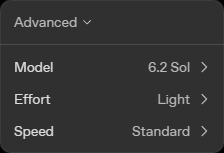
- Model
- Which model to use, here Sol 6.2.
- Effort
- Reasoning level, shown here at Light. Speed is a separate setting.
See OpenAI's GPT-6.2 guide to Work and Codex for current availability by interface.
What about Rankerfox?
ChatGPT Pro is part of Rankerfox Premium. Astra and Sol 6.2 have not yet been confirmed through that access. If either version matters to your decision, check the models shown in Work within your session. The API rates above are OpenAI's charges, not Rankerfox subscription prices.